In this guide
LinkedIn video marketing can show potential clients how you work. You might explain a common problem, share a lesson from a project or let a customer describe their experience.
Choose a subject you know well and talk about it as you would with a client. Get to the subject quickly, then give people enough detail to learn something.
Use the example and checks below to plan, publish and review your next LinkedIn video.
LinkedIn video example: SULO
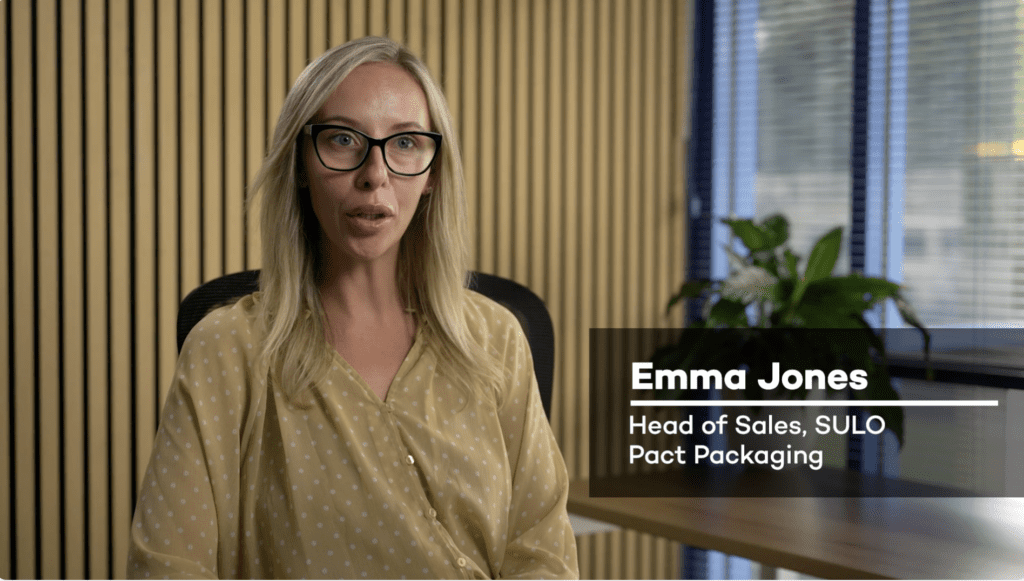
Dream Engine produced this International Women’s Day video featuring Emma Jones, introduced in the film as Head of Sales at SULO, part of Pact Group. She discusses her career and the opportunities available to women in manufacturing.
The film combines a seated interview with footage of Emma speaking with a colleague on the factory floor. Her name and role appear on screen, while the workplace footage gives viewers a look at the environment she describes. For someone considering a career in manufacturing, those details help make the discussion concrete.
The campaign title cards establish the International Women’s Day theme. For a shorter LinkedIn feed edit, one option would be to open with Emma’s advice at around 1:16 about being willing to learn, then introduce her. That would give the shorter version one clear subject while keeping the fuller interview available for viewers who want more context.
Cover one main idea
Decide what the video needs to explain before you film. A question such as “What should we prepare before an interview shoot?” gives you a more useful starting point than a broad topic such as “video production”.
Answer the question early, then give an example. If your first thirty seconds are introductions and background, try starting with the answer and see what you can cut.
There’s no need to force every video into the same length. A short tip may need less than a minute. A detailed customer story can take longer. Split a subject into separate videos when each part can make sense on its own.
Write a specific opening line

The post text should tell someone what they’ll get from watching. “Three things to check before recording a customer interview” is more useful than “Excited to share our latest video”.
You can also open with a question clients ask you, or describe a problem the video addresses. For example: “Your interview location looks great, but what does it sound like?”
Make sure the video delivers on that opening. Don’t promise a surprising result if you’re offering straightforward advice.
Add captions and check them

Someone watching on a train or in a shared office may have the sound off. Captions let them follow the spoken explanation. They also help people who are deaf or hard of hearing.
Captions built into the video are always visible. Closed captions are a separate text track that viewers can switch on or off. If you use both, preview the post to check that two sets of captions aren’t covering each other.
When uploading to LinkedIn, you can enable automatic captions and choose to review them before viewers see them. Correct the generated text and approve it when it is ready. For scheduled posts, that review is available after the video has been posted. See LinkedIn’s instructions for adding and editing auto captions.
Check people’s names, company names and technical terms, and make sure the words appear at the right time.
Watch the finished video on a phone. The text should be large enough to read and shouldn’t cover a face, a product detail or anything else the viewer needs to see. If the explanation depends on a diagram or demonstration, keep that visible too.
Speak as you would to a client
You don’t need to adopt a formal presenter voice for LinkedIn. Use the words you’d use when explaining the same thing in a meeting.
Our presenting on camera tips can help contributors prepare. A few notes beside the camera can help you stay on track. If you’re working from a script, read it aloud first and change any sentence you’d never say in conversation.
Be specific about your experience. Describe what happened on a job, what you changed and what someone else could learn from it. Leave out claims you can’t back up.
Make time to reply
Check the comments after you publish. If someone asks a question, answer it. If they describe a similar experience, ask a follow-up question.
Those conversations can give you ideas for another video. A question that comes up repeatedly may deserve its own explanation.
Check what people actually watch
Open the video’s analytics after publishing. LinkedIn counts a video view when someone watches for more than two seconds, so a view count alone doesn’t tell you how much of the explanation they saw. Its video analytics include average watch time and information about viewers’ job titles, locations and companies, where available. See LinkedIn’s video analytics guide.
Compare videos of a similar length and purpose over the same period after publication. If one has a lower average watch time, review its opening, pacing and relevance to the audience. Try changing one element in the next comparable video. Treat the comparison as a clue, rather than proof that one editing choice caused the result.
Look at who responds as well as how many people watch. A useful discussion with a prospective client can tell you more than a large view count. For a video about career opportunities, questions about roles or career pathways would also be worth noting.
Before you publish
- One clear subject that matters to the people you want to reach.
- An opening that gets to the point and matches the post text.
- Speech that is easy to hear, with music kept below the voice.
- Accurate captions that don’t cover faces or useful detail.
- Framing and text checked on a phone, including any square or vertical crop.
- One relevant next step, such as asking a question or visiting a careers page.
For advice on planning videos for several platforms, read our social media video production guide.
If you’d like help planning, filming or editing LinkedIn videos, get in touch with Dream Engine. Tell us what you’d like to cover and who you want to reach.
LinkedIn video planning
LinkedIn videos: frequently asked questions
Plan a clear subject and check the finished post from the viewer’s perspective.
How long should a LinkedIn video be?
Choose the length according to the subject. A short tip may need less than a minute, while a detailed customer story can take longer. Get to the answer early and split a subject into separate videos when each part can stand on its own.
Should I add captions to my LinkedIn video?
Captions help people follow speech with the sound off and improve access for people who are deaf or hard of hearing. Check names, terms and timing, and preview the post so that separate caption tracks do not overlap.
What should the opening line say?
Tell viewers what they will get from watching. Use a specific client question, useful check or problem the video addresses, and make sure the finished video delivers on that opening.
How should I assess a LinkedIn video after publishing?
Review average watch time and responses from the people you want to reach alongside the view count. Compare videos of similar length and purpose over the same period, and treat differences as clues rather than proof that one editing choice caused the result.

Ryan Spanger is the founder and managing director of Dream Engine, a Melbourne video production company established in 2002. Over the past two decades, he’s produced hundreds of videos for businesses, government departments, universities and healthcare organisations across Australia. Ryan specialises in helping organisations explain complex ideas through clear, engaging video content, with particular experience in corporate communications, training and education.