
Who needs to see it?
Tell us who you want to reach and what they already know. New customers may need an introduction to your business. Staff or existing clients may need more detail about a particular subject.
Video production company in Melbourne, Australia.
When you brief us, tell us where you’ll use the video. This helps us plan the edits, captions and file formats you’ll need before filming starts.

Before filming
A website case study might run for a few minutes. For social media, you might want a short clip from the same interview.
If you’re planning both, we’ll record enough material for the longer story and frame the interview so it can also be cropped vertically.
You may also want different endings. An ad could finish with an invitation to book a demo, while a training video might direct staff to a short quiz. We can record any extra lines during the shoot.
Who will publish it? Your team or marketing agency usually handles uploads, scheduling and campaign management. If you need help publishing, let us know when we quote.
These questions help us write the production brief and work out which versions you’ll need.
Tell us who you want to reach and what they already know. New customers may need an introduction to your business. Staff or existing clients may need more detail about a particular subject.
List the pages, platforms or events where you’ll use the video. For an event, tell us about the screen and sound setup. For staff training, let us know which learning system you use.
Be specific about what you want someone to understand or do after watching. They might need to compare two products, book an appointment, register for an event or learn a procedure.
For a single website video, we’ll confirm the file format with whoever is uploading it. For a larger campaign, we’ll also need a list of versions, deadlines and the people approving each edit.
We’ll talk through who the video is for, what it needs to cover and what you want it to achieve.
Together, we’ll list the website pages, social posts, events, internal systems, broadcasts and paid ads you have planned.
We confirm the length and aspect ratio of each edit, along with captions, graphics and calls to action. We’ll also check file types, delivery dates and your agency’s specifications.
We plan the script and prepare a shot list for all the edits you need. The crew can then allow for different crops, graphics and presenter lines during filming.
We review the picture, sound and captions, checking names, logos and spelling. We also confirm that each file meets the required duration and export settings.
Once you’ve approved the edits, we send the final files to you or the person uploading them. The filenames identify the version and format.
Let us know if you need extra versions. We can include them in the quote and filming schedule. If a new request comes up later, we’ll check whether it needs extra editing or filming and confirm the cost with you.
Editing
A longer edit gives you time to explain a product or tell a customer’s story. For a short social post, focus on one useful point from that video.
We’ll work out how long each edit needs to be and whether it should be landscape, square or vertical. We can also make versions with different openings, endings or captions.
For a vertical version, we need to keep faces and important details inside the narrower frame. Captions and graphics also need enough space to be read on a phone.
Distribution
Look at how you already communicate with the people you want to reach. If customers read your email newsletter, include the video there. If staff use an intranet, put the training video where they can find it again.
Put a product demonstration on the relevant product page, or a staff induction in your learning system. In an email, link a thumbnail to the page where readers can watch the video.
Before publishing: check the video on the page, including playback size, captions and access permissions. Put any enquiry or registration link nearby.
Choose an excerpt that answers a question or shows something useful to your followers. Write a short introduction so people know what they’re about to watch.
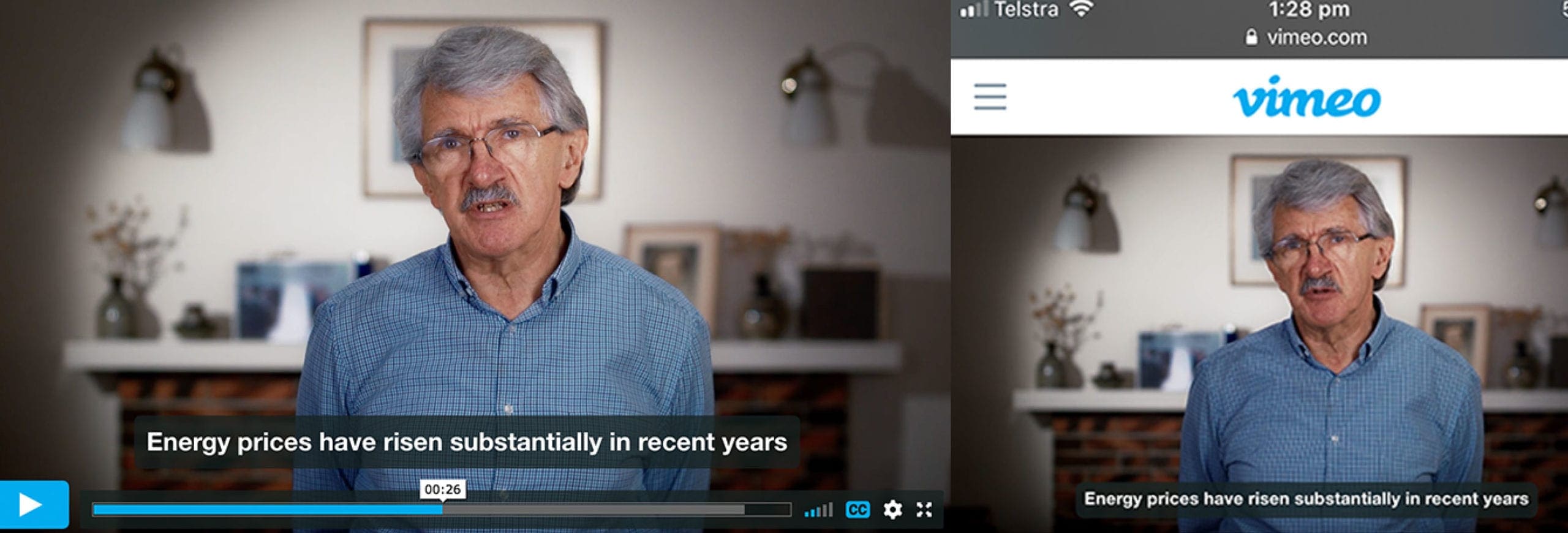
Before posting: watch the clip on a phone with the sound off. Check that the captions are readable and the opening makes sense without the rest of the video.
Ask your agency or media contact for the required duration, file specifications, approval process and delivery deadline before production begins.
Before delivery: check the booking dates and final wording. Confirm the approvals and delivery instructions with the agency or broadcaster, including any legal or brand checks.
Online viewing
To show a video on your website, you’ll need somewhere to host it and a player on the page. Options include YouTube, Vimeo and business video platforms. Internal videos may belong in your organisation’s learning system.
Ask your web team which players work with your site. Before choosing a service or plan, check its privacy settings, captions and viewing reports, and whether it shows advertising or its own branding.
Decide who will own the account and look after uploads and access settings. This is usually someone in your web or IT team. If you need our help with setup, mention it when we quote.
For a public marketing page: test playback on a computer and a phone. Check the captions and any links asking viewers to enquire, book or register.
For internal or training use: check who can watch, how completion will be recorded and whether captions work in your learning system.
Delivery
We’ll list the files included in your quote. Tell us which of these you need.
The approved main video in the agreed resolution and format.
Shorter edits, square or vertical versions, and any alternative openings or endings you’ve requested.
Separate caption files for a compatible player, or burnt-in captions added directly to the picture.
The still image people see before they press play.
A checked text version of the dialogue, for use alongside the video or as a reference.
Filenames showing the version, format and approval status. For example: demo-30s-vertical-approved.mp4.
After the release
Decide what you’ll measure before the video goes out. Your web team or agency may need to set up tracking for links, registrations or enquiries.
Use the results and viewer feedback to plan your next edit. You may need to shorten a section, explain a point in more detail or answer a question the video didn’t cover.
Check the audience information available in your video platform or campaign reports. See whether you’re reaching the people you intended.
Look at viewing time, the percentage who finished and any points where people stopped watching.
Track the response you asked for, such as an enquiry, event registration or download. Consider these figures alongside the rest of your campaign results.
Check completion records and ask staff questions about the procedure. Find out what they understood and what still needs explaining.
Getting started
Who needs to see the video and what they already know about the subject.
What you want someone to understand or do after watching.
The website pages, social posts, events, internal systems, paid ads or broadcasts you have planned.
Any specifications from your web team, agency, broadcaster, learning system or campaign platform.
The person handling uploads, writing social posts and scheduling, plus your agency contact if you’re running paid ads.
Who will approve each version and when each file needs to be ready.
Frequently asked questions
Include it in the brief, before filming. Tell us where you’ll use the video and which versions you need, so we can allow for the footage, editing time and file formats.
We usually supply the finished files for your team or agency to publish. If you’d like us to upload a video or help with another publishing task, let us know when we quote so we can confirm what’s included.
You may be able to use the same file in several places. Separate edits are useful when you need a shorter video, a vertical crop or a different ending. Ads may also have a set duration or file specification.
Choose based on how you’ll use the video and what your website needs. Compare privacy settings, advertising, player branding, captions and viewing reports on the plans you’re considering. Ask your web team to confirm that the player works on your site.
Yes. Ask for them in the brief so we can include them in the quote. We can supply separate caption files, captions fixed into the picture, and a transcript. We’ll confirm the language, format and who will check the wording.
The files listed in your quote. These can include the main video, shorter edits, web and social versions, captions, a thumbnail and a transcript. Tell us who will upload them so we can check any technical requirements before delivery.
Start with what you wanted the video to achieve. For an event promotion, check registrations from the campaign. For training, check whether staff finished watching and understood the procedure. Viewing time and feedback can help explain the results.
Let us know who it’s for, where you’ll use it and when you need it. If you’re still working out the details, we can talk them through with you.
