In this guide
How to Plan and Produce an Effective Corporate Video
Whether you are creating a company overview video, customer case study, recruitment video, product demonstration, or internal communications piece, good planning has a significant impact on the final result. For corporate videos, start by agreeing on the audience, purpose, scope and approval process.
After producing corporate videos for businesses, government departments, education providers, and larger organisations for more than 20 years, these are the principles that consistently lead to better results.
Start with a Clear Objective
Before thinking about scripts, locations, or filming, decide what you want the video to achieve. This is one of the most important parts of corporate video production because it guides almost every decision that follows.
Your objective might be to:
- Generate enquiries
- Explain a product or service
- Launch a new initiative
- Recruit staff
- Train employees
- Build trust with customers or stakeholders
- Communicate an internal message clearly
When the goal is clear, it becomes much easier to make decisions about the message, format, filming style, interview questions, duration, and distribution plan.
For example, a recruitment video will usually focus on culture, people, and the employee experience. A customer case study will focus more on the problem, the solution, and the result. Training videos need to be clear, structured, and easy to follow.
This early decision gives the whole project direction.
Develop Your Core Message
Every corporate video needs structure. Even if the content is simple, the viewer should feel guided from the opening idea through to the final message.
One of the most common mistakes in corporate video production is focusing too heavily on what an organisation does. Viewers are usually more interested in how it helps them. The strongest videos connect products, services, or initiatives to a real outcome or benefit.
A basic structure could include:
- An introduction to the product, service, organisation, or idea
- The problem, need, or opportunity it responds to
- What makes it useful or different
- How it helps the audience
- What the viewer should do next
Business case study videos can take this further by showing a real experience or a human result. In these projects, we often start by identifying the challenge the client faced before introducing the solution. This creates a natural story that helps viewers understand the value being delivered.
Demonstrations are also effective when you want to highlight practical benefits or help viewers understand how something works.
When the story is clear, the rest of the production becomes much easier.
Plan Ahead
Corporate video production works best when the planning is thorough. This includes confirming locations, preparing interview subjects, checking equipment, and making sure everyone involved knows what to expect.
Before shooting day, it helps to:
- Confirm times, locations, and talent
- Provide simple wardrobe and appearance guidelines
- Share the call sheet
- Prepare a shot list so nothing is missed
- Develop a basic storyboard when the format requires one
- Confirm who needs to approve the script, schedule, and final edit
Good planning avoids delays and keeps the day running smoothly.
On many corporate video projects, we find the most useful planning exercise is simply identifying the three key messages the audience should remember. Once those messages are agreed upon, decisions around interview questions, filming locations, graphics, and supporting footage become much easier.
For interview-based corporate videos, planning the questions in advance is especially useful. The questions should be simple enough to answer naturally, but specific enough to draw out useful content.

Choose a Location That Supports the Story
The location should add context and feel credible for the person and subject on screen. A scientist in a lab, a teacher in a classroom, or a company director in their workplace can help the viewer understand the environment and the story being presented.
For interviews, choose a space that is quiet, controlled, and free from unnecessary interruptions. A visually interesting room may still be unsuitable if there is traffic noise, room echo, confidential material in the background, limited power, difficult access, or people moving through the shot.
Check sound, light, access, privacy, safety, power, filming permission, and the effect on normal work before confirming the space. Where the location is complex or unfamiliar, a location scout can identify problems while there is still time to solve them.
Engage Your Audience
Viewers respond to clarity, confidence, and a relatable message. You can do this by introducing a question, a challenge, or a situation that the audience recognises, and then resolving it through the content of the video.
A few practical points:
- Use short, clear soundbites
- Choose interview subjects who know their material
- Keep the overall duration tight
- Avoid trying to include too many messages in one video
If the video is aimed at a specialist audience, connect the expertise to common situations they understand. Technical information can still be engaging when it is explained through a relevant problem, example, or outcome.
This is particularly important for professional services, healthcare, education, government, finance, and technology organisations where the subject matter can be complex.
Help Interviewees Feel Comfortable
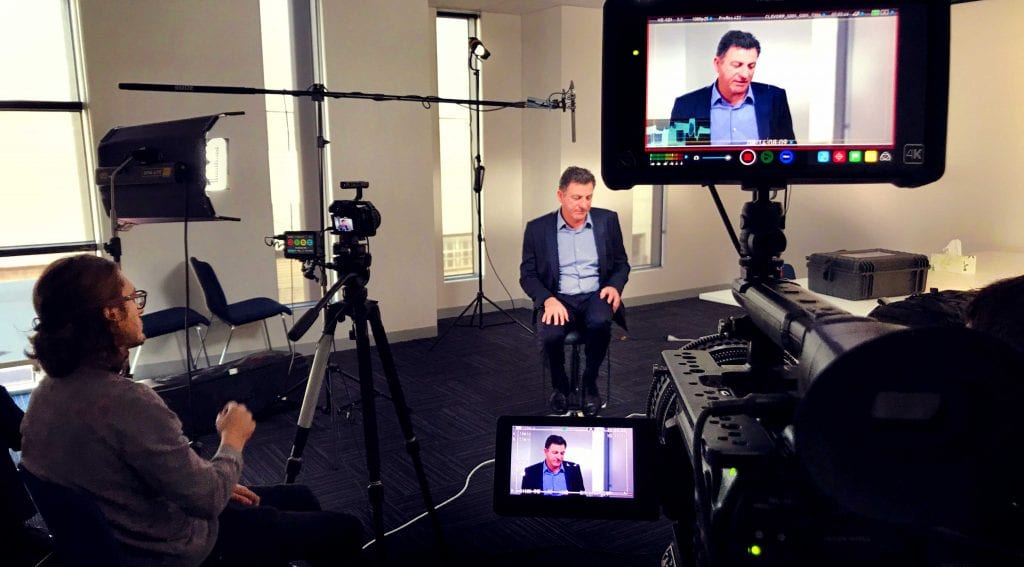
Many people feel nervous on camera. Arrive prepared, explain how the interview will work, build rapport before recording, and begin with straightforward warm-up questions. A calm, organised set helps the interviewee concentrate on what they want to say instead of the equipment around them. See our advice on how to help people feel comfortable on camera.
Questions should be simple and specific enough to draw out useful material without giving the person a speech to memorise. Listen to each answer and ask follow-up questions when an example or detail needs clarification. Pauses and retakes are normal. The aim is to help the person explain the subject clearly in their own voice. Our guide to shooting professional video interviews covers the wider interview setup.
Capture B-roll That Supports the Edit
B-roll is the supporting footage that shows the people, location, product, or process being discussed. It adds visual interest and context, but it also helps the editor cover cuts between interview answers and shorten a response cleanly.
Plan the B-roll around the message and likely edit points. Capture relevant actions, interactions, products, equipment, locations, and close details that illustrate what the audience is hearing. A purposeful mix of wide, medium, and close shots usually gives the edit more flexibility than a large volume of unrelated office footage.
The goal is not to film as much as possible. It is to capture a useful range of real activity that supports the story and has the necessary permissions and approvals.
Create a Look That Suits Your Business
Visual style shapes the viewer’s perception. Lighting, locations, camera movement, framing, sound, and colour all work together to create the right tone.
We tailor the look to match your brand. A financial services video needs a different feel from a retailer, education provider, government department, or a construction company video. Colours, wardrobe, graphics, and locations all contribute to the identity of the final piece.
Professional production values show attention to detail and make the video more enjoyable to watch. This does not mean every video needs to feel highly polished. Some projects work best with a natural and authentic style. Others benefit from a more premium production approach.
The right choice depends on your brand, audience, and objectives.
Plan Your Distribution Early
Many organisations spend considerable time planning the production but leave distribution until the end. In reality, how the video will be used should influence decisions long before filming begins.
A corporate video may be used across:
- Your website
- LinkedIn and social media
- Email campaigns
- Sales presentations
- Recruitment campaigns
- Internal communications
- Training programs
- Conferences and events
Knowing this early helps shape the content and edit. A website video may take more time to establish context. A social media version often needs to communicate the message much faster. A sales video may need to address common questions or concerns.
It is also worth considering whether the project should include multiple deliverables. When scoped and planned before filming, a single filming day can often produce a main corporate video, social media cutdowns, recruitment content, internal communications material, and shorter promotional clips.
Video distribution is just as important as production. Your website, YouTube channel, LinkedIn presence, email marketing, and sales process all provide opportunities to extend the reach and value of the content you create.
Before Filming
Before filming, check that the brief names the audience, main message, filming requirements and places the video will be used. Our video production brief guide gives your team a starting point.
Planning these elements together helps the video do its job, whether that’s explaining a service, recruiting staff or teaching a process.
If you are planning a corporate video and would like guidance on the strategy, production process, or creative approach, take a look at our Corporate Video Production Melbourne service to see examples of our work and learn how we help organisations create effective corporate videos.
Corporate video planning
Corporate video planning: frequently asked questions
Prepare the content, contributors and shoot.
How long should a corporate video be?
There is no fixed length that suits every project. One to three minutes is a useful range for many website and overview videos, while a detailed case study, recruitment story, or training piece may need longer. The right duration is the shortest version that explains the message properly without rushing or repeating it.
Should we script our corporate video or use interviews?
It depends on the objective. Interviews often feel more natural and work well for case studies, recruitment videos, and leadership communications. A script can be useful when the wording needs to be controlled, such as a product explanation, compliance message, or brand campaign. Many corporate videos use both.
How many key messages should a corporate video include?
Most corporate videos are clearer when they focus on three key messages: one primary message and up to two supporting points. Trying to communicate too many ideas can make the video harder to follow and create unnecessary approval changes.
How do we choose the right filming location?
Choose a location that supports the story and can be controlled for filming. For interviews, check background noise, interruptions, room size, access, light, privacy, safety, power, and filming permission. For supporting footage, make sure there is relevant activity that can be filmed safely and with the required approvals.
What makes a good corporate interview?
A good interview is relaxed, clear, and specific. Brief the person on the topics rather than giving them answers to memorise, explain the process, allow time for a warm-up conversation, and ask simple questions. Follow-up questions often produce the examples and detail that make an answer credible.
What B-roll should we capture?
Capture footage that illustrates the points likely to appear in the edit. This may include people working, customer interactions, products, equipment, locations, demonstrations, and close details. Plan a range of wide, medium, and close shots, but prioritise real actions that help the audience understand the organisation or subject.
Where should we publish our corporate video?
The right primary channel depends on the audience and purpose. A service-page video may live on your website, while recruitment, training, internal communications, presentations, or social cutdowns may have a different primary home. Choose the channels before filming and create versions suited to each viewing context.
Can one corporate video be used in multiple ways?
Yes, if this is planned before filming. The same shoot can often produce a main video, shorter cutdowns, vertical clips, internal updates, and presentation assets. The brief, shot list, framing, interview questions, and usage permissions should account for those versions from the start.

Ryan Spanger is the founder and managing director of Dream Engine, a Melbourne video production company established in 2002. Over the past two decades, he’s produced hundreds of videos for businesses, government departments, universities and healthcare organisations across Australia. Ryan specialises in helping organisations explain complex ideas through clear, engaging video content, with particular experience in corporate communications, training and education.