
Screen capture videos are a useful way to explain software, websites and online systems. Whether you are onboarding new employees, introducing a customer portal or explaining a product update, showing people exactly what happens on screen can make a process easier to follow.
At Dream Engine, we produce professional screen capture and software training videos that help organisations explain complex processes in a simple and engaging way. Our clients use them to:
- Explain new software features and updates
- Improve staff onboarding and training
- Answer common customer support questions
- Standardise training across teams and locations
- Create reusable learning resources that are available anytime
What are screen capture videos?
Screen capture videos record activity within a website, application or software platform and guide viewers through a task step by step. They can include professional narration, on-screen text, digital zooms, animation and visual highlights that direct attention to the most important parts of the interface.
Dream Engine has produced screen capture videos for universities, software companies, technology businesses and other organisations that need to explain systems and processes clearly.
Why use screen capture videos?
Screen capture videos let users pause, replay a step and follow along in the software. They demonstrate where to click, what to expect and how each part of the process works. Pairing the video with written steps gives viewers a reference they can scan when they return to the task.
When should you use screen capture videos?
Screen capture videos are particularly useful whenever your audience needs to complete tasks within a website, application or internal system. You can show the entire process exactly as it happens, including where to click and what should appear next.
Popular uses include:
- Introducing users to a new website, portal or platform
- Training employees to use an internal system or complete a process
- Showing customers how a software product or application works
- Explaining new features introduced through a software update
- Guiding users through online forms, applications and account setup
These videos can sit in a learning management system, help centre or staff intranet, close to the task they explain. For a quick reference, a written checklist or annotated screenshot may be all the user needs.
Examples of our screen capture videos
These projects show different ways to combine screen recordings, narration, animation and presenter footage.
Software feature update videos for Pronto Software
Pronto Software develops enterprise resource planning (ERP) software for organisations across manufacturing, distribution, retail and service industries. To support the release of a major software update, Dream Engine produced a series of videos explaining the platform’s newest features.
Working closely with Pronto’s product team, we combined presenter footage, professional screen capture and tailored onscreen animation to demonstrate each enhancement clearly. The finished series created a reusable library of product education content for onboarding and training.
Software training video for Adslot
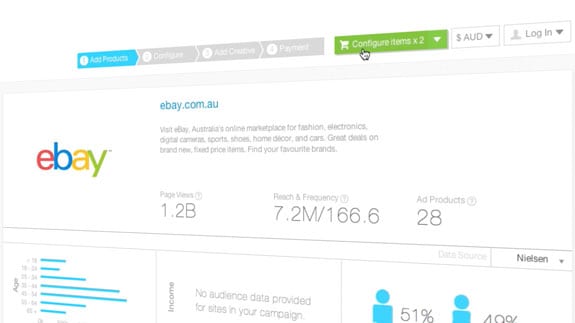
When Melbourne-based advertising technology company Adslot needed to show new users how to use their advertising purchasing system, they chose screen capture video. Using digital zooms, animated movement and on-screen text, we created a concise tutorial that clearly demonstrated each step of the process. Running at just over four minutes, the video brought the steps together in a single walkthrough that users could pause and revisit.
Student onboarding video for Western Sydney University
For Western Sydney University, we produced a screen capture video that guided online students through logging into the university’s ebook library. Clear visual cues and step-by-step walkthroughs showed students how to follow the process. The university had a single resource students could access whenever they needed assistance.
University application walkthrough for Deakin University
When Deakin University wanted to simplify its online application process, we produced a screen capture video that walked prospective students through each stage of the system. Rather than relying on written instructions, applicants could see exactly what would appear on their screen, making the process easier to follow and reducing uncertainty.
What to plan before recording
Before recording, we script the tutorial and plan the sequence of actions. We then record the screen and narration, using digital zooms and animation to highlight the interface elements being explained. Depending on the project, we can also combine screen recordings with presenter footage, motion graphics and branded animation to create training videos that are engaging without distracting from the information being explained.
Our screen capture production process explains the briefing, scripting, recording and review stages.
- One task per tutorial. Agree what the viewer should be able to do, then have someone who knows the software check the script and completed walkthrough.
- A clean demonstration account. Use sample data, close unrelated tabs and turn off notifications so private information does not appear in the recording.
- Readable, accessible instructions. Check interface text at the size viewers will watch it. Name buttons in the narration, allow time to follow each step, and provide checked captions and a descriptive transcript. W3C’s accessible media guidance explains what to plan.
- A way to keep it current. Record the software version and review the tutorial when the interface or workflow changes. Separate task videos make it easier to replace an affected section.
Screen capture videos: frequently asked questions
What are screen capture tutorial videos?
Screen capture videos record what happens on a computer screen and explain it step by step using narration, on-screen text and graphics. They are commonly used for training, onboarding, software walkthroughs and customer support.
When should a business use screen capture videos?
Screen capture videos are useful when you need to explain a system, website or process clearly and consistently. They work well for internal training, customer onboarding, product tutorials and answering repetitive support questions.
How long should a screen capture video be?
Aim to cover one task in the time it takes to explain it properly. A simple tutorial may run for 60 seconds to four minutes; a more involved process may need longer. Split separate tasks into individual videos so users can find the step they need.
Are screen capture videos better than written documentation?
It depends on the task. Screen capture videos show users what they will see and do, while written guides are easy to scan and update. Using both lets people watch a demonstration and refer back to individual steps.
Do screen capture videos need professional production?
A simple internal explanation may only need a well-recorded screen and clear narration. Professional production is useful for customer-facing tutorials, complex processes or a consistent series. Clear audio, well-paced editing and readable text matter in either case.
Can screen capture videos reduce support and training costs?
They can help by answering common questions and giving staff and customers guidance they can revisit. Savings are not guaranteed. Track the relevant support enquiries and whether users can complete the task to assess the result.

Ryan Spanger is the founder and managing director of Dream Engine, a Melbourne video production company established in 2002. Over the past two decades, he’s produced hundreds of videos for businesses, government departments, universities and healthcare organisations across Australia. Ryan specialises in helping organisations explain complex ideas through clear, engaging video content, with particular experience in corporate communications, training and education.

