An animated business video usually moves through research, concept, script, storyboard, voiceover, design, animation and review before delivery. Each stage answers a different question: what needs explaining, what viewers will see and hear, and whether the finished sequence makes sense.
Understanding the process helps you supply the right material and involve your reviewers early. An animated video can explain a product, service or procedure, but its usefulness depends on the decisions made before anyone starts moving objects on screen.
What is animation?
Animation creates the appearance of movement from drawings, graphics or three-dimensional models. It can also sit alongside corporate video production: a filmed interview might establish the context, while an animated diagram shows a process that a camera cannot easily capture.
The format follows the explanation. Our 2D and 3D animation examples show different approaches and the kinds of subjects they can help communicate.
Watch: Dream Engine animation showreel · 1 min 6 sec
Notice the range of illustration, typography and movement. A showreel brings short extracts together; the pace of your full video should give viewers time to follow its subject.
Key steps in the animation process
The stages below describe our approach to a business animation. Some work overlaps: music can be explored while illustrations are developed, for example. The agreed production schedule should identify the decisions needed before each stage proceeds.
1. Research: gathering background information
We begin with the audience, the subject and the purpose of the video. Useful source material includes product information, brand guidelines, diagrams, existing presentations and the questions your customers or staff regularly ask.
- Audience: What do viewers already know, and where do they get stuck?
- Message: What should they understand or do after watching?
- Evidence: Who can verify technical details, figures and claims?
- Use: Will the video appear on a website, in a presentation, at an event or on social media?
- Style: Which references suit the subject, brand and available budget?
When reviewing reference videos, explain what appeals to you: the drawing style, the narrator, the way a diagram builds or the pace. That gives the team more direction than a request to make something similar.
2. Concept development and script writing
Concept development: choosing the idea
The concept establishes how the explanation will unfold. A customer story might follow one person’s problem and resolution. A process video might trace an item through several steps. We outline the proposed approach, tone and visual direction in a concept brief before developing the detail.
Bring the people responsible for final approval into this discussion. Agreeing on the audience and main message now reduces the chance of discovering a different brief after the animation has been built.
Script writing: putting the idea into words
An animation script describes both the narration and what appears on screen. These two parts need to work together. If the voiceover explains a handover, the visual might show a document moving between people, with a label identifying who is responsible.
Read the narration aloud and allow time for viewers to absorb diagrams and on-screen text. A script that fits on a page may still be too dense when spoken. Our guide to explaining complex ideas with 2D animation looks at this relationship between words, images and timing.
At script review, check the factual meaning, names, terminology and proposed call to action. Resolve conflicting stakeholder comments before approving the next version.
3. Storyboard: planning what viewers will see
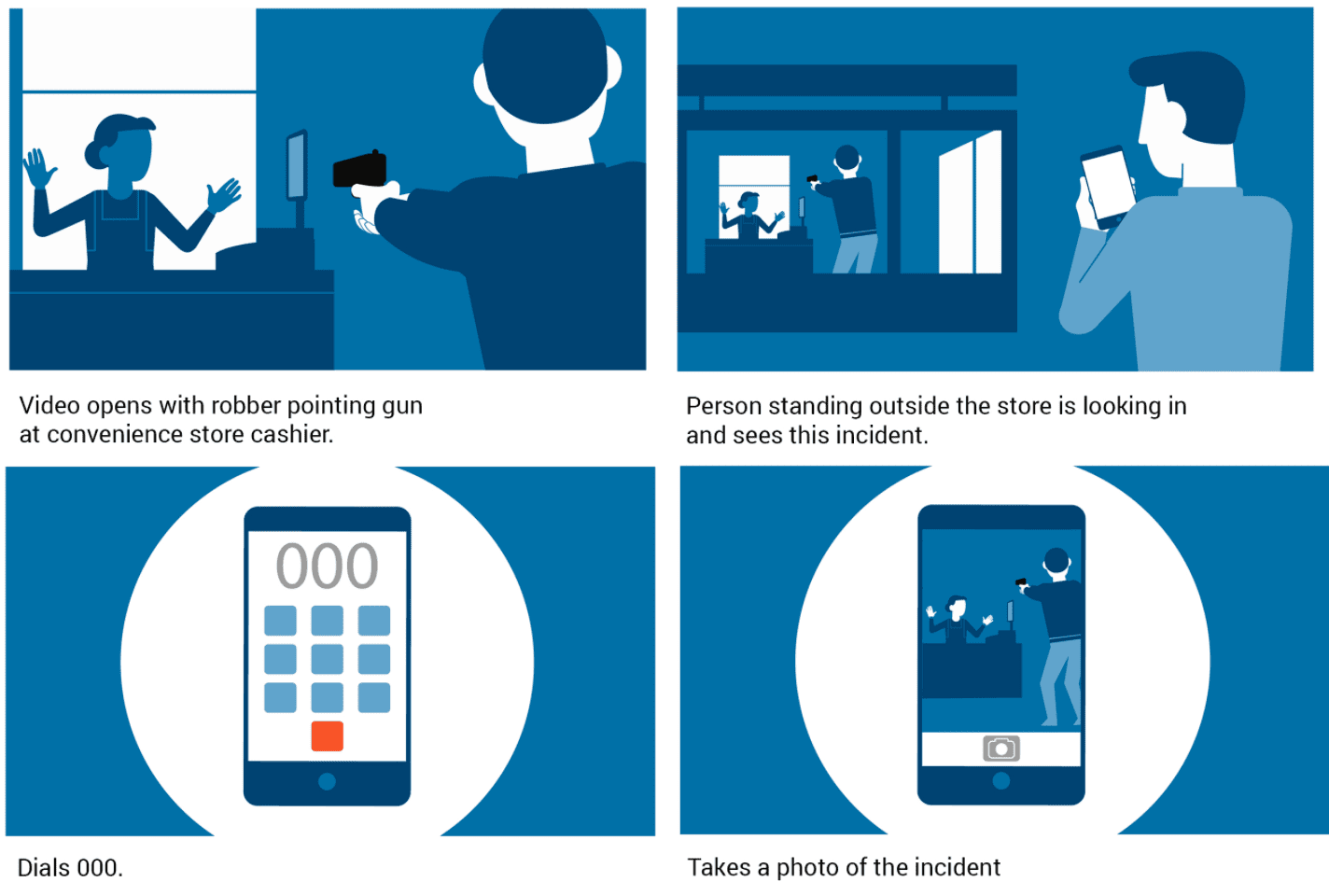
A storyboard lays out the key scenes as still images, with notes describing the action. It lets you check the order of information, the people or objects shown and the relationship between each image and the script.
In the example below, four frames show an incident, a witness, an emergency call and a photograph. The drawings and notes make the sequence reviewable before those actions are animated.
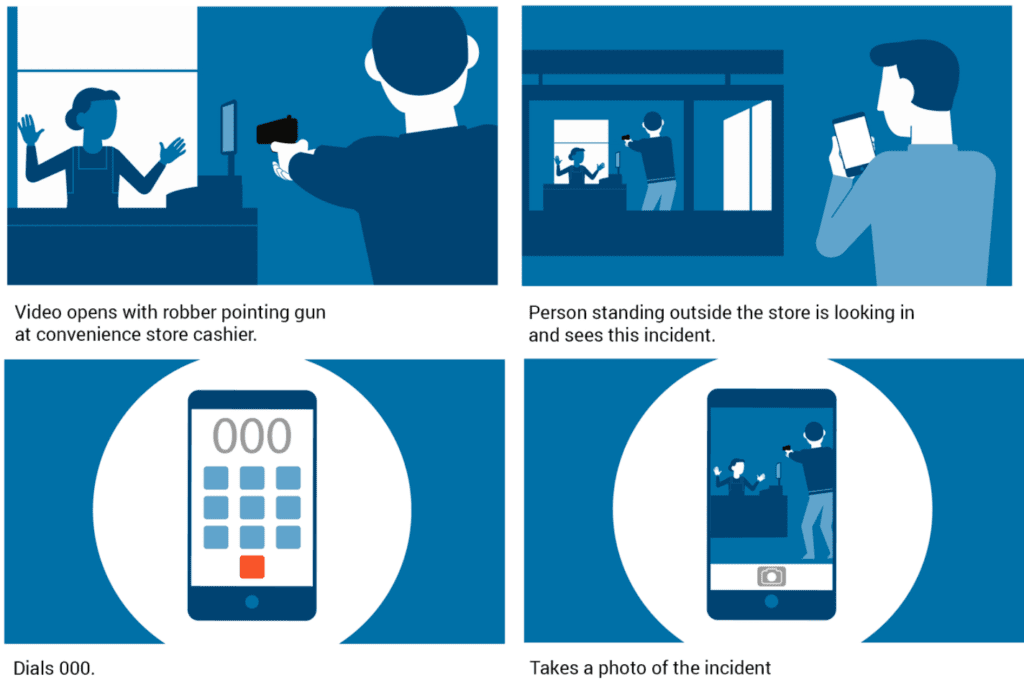
A still storyboard cannot demonstrate exact timing. Where timing needs to be tested, the frames can be assembled into an animatic: a rough timed sequence, often with a temporary voice track. Finished design frames establish the visual treatment; the animatic helps assess how the explanation unfolds.
Review the decision for this stage. At storyboard review, check the content and scene order. Ask which drawings are final artwork and which are placeholders, so everyone understands what they are approving.
4. Voiceover recording
We work with you to choose a voice that suits the subject and audience, then record the approved narration. The delivery establishes much of the timing: a pause may give viewers space to read a label or follow a change in a diagram.
Supply pronunciations for names, acronyms and specialist terms before recording. A temporary guide voice can help with early timing, but the final recording may need different pauses. Confirm the words before recording and review the performance before detailed synchronisation.
5. Music selection: matching the pace and subject
We select suitable tracks from stock music libraries, listening for a pace and mood that suit the subject. Music should leave room for the voiceover and sound effects. Review a track against the pictures and narration, as its effect can be quite different when heard on its own.
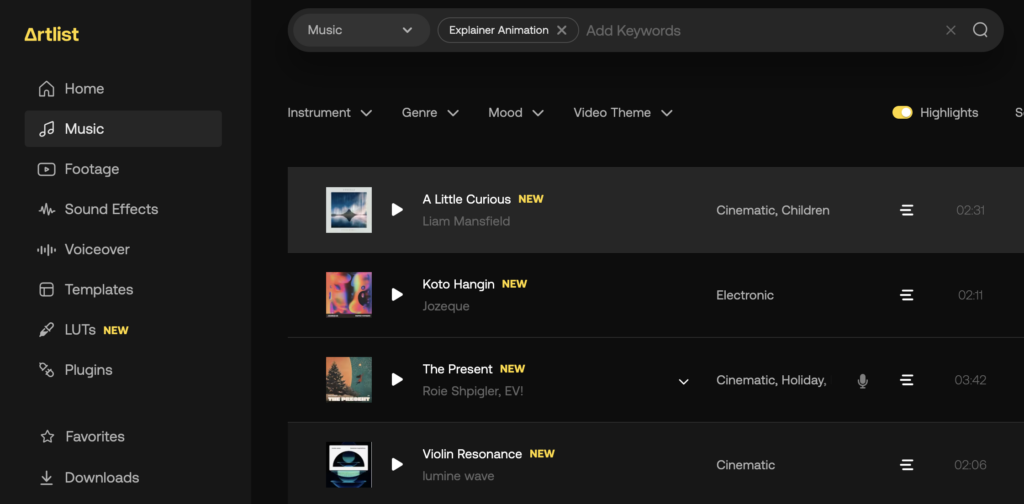
Confirm that the music licence covers the agreed distribution. Extra versions or a change in use should be considered before the final files are prepared.
6. A short animated segment: reviewing style and pace
We create a short animated segment, usually 15–30 seconds, using the script, storyboard, voice track and music. It gives you a more concrete view of the proposed illustration style, movement and timing before the full sequence is completed.
Choose a representative section for this review. A logo reveal will not answer every question about a video built around characters or technical diagrams. Check text size, reading time, transitions and whether the movement draws attention to the right information.
7. Animation: building the full sequence of scenes
Once the short segment is approved, the animators develop the remaining scenes and connect them into the full video. They time movement to the voice track, build transitions and check that colours, labels and visual conventions stay consistent.
A scene can look good in isolation yet interrupt the explanation when placed beside the next one. Reviewing the whole sequence helps identify repeated information, abrupt changes and moments where viewers need more time.
8. Feedback and revisions: reviewing the video
We send the draft for review at the agreed stages. The scope sets out the included rounds of changes. Gather comments from your stakeholders into one set of feedback, with one person responsible for resolving disagreements.
Make feedback specific. “At 00:24, the label should say ‘approved application’ because this step happens after review” gives the animator a precise change and its reason. Separate factual corrections from preferences about colour, pace or music.
Check the video on the kind of screen your audience will use. Ask a colleague unfamiliar with the subject to explain the process back to you. That can reveal missing context that a subject expert no longer notices.
If a request changes an approved script or adds scenes, we discuss the effect on the schedule and budget before proceeding. A wording change can also affect the recording, scene length and animation that follows it.
Watch: Digitary explainer animation · 2 min 3 sec
This completed Dream Engine animation brings narration, illustrated people, text and transitions together to explain a digital credential service. Watch how each visual supports the part of the explanation being spoken.
9. Delivery: sharing the final video
After approval, we supply the agreed video files, usually through a download link. Confirm the delivery requirements early: aspect ratios, resolution, captions, languages, shorter edits and any versions intended for silent playback.
Check the final export as well as the review copy. Confirm spelling, contact details, caption timing and the opening and closing frames. Uploading a file to its intended platform is also a useful check of how it displays in context.
If you expect product details to change, discuss future updates and the retention or handover of project files as part of the scope. Receiving the finished video does not automatically establish rights to every underlying asset.
Planning your animation
The animation process works best when each review settles the questions needed for the next stage. Start with the audience, gather reliable source material and nominate the people who will check the facts and approve the work. Allow time for those decisions in the schedule.
You do not need a finished script to begin. Bring your objectives, examples and any existing material, and we can help shape the approach. Learn more about our animation video production services.

Ryan Spanger is the founder and managing director of Dream Engine, a Melbourne video production company established in 2002. Over the past two decades, he’s produced hundreds of videos for businesses, government departments, universities and healthcare organisations across Australia. Ryan specialises in helping organisations explain complex ideas through clear, engaging video content, with particular experience in corporate communications, training and education.