In this guide
A lot of online video is watched without sound. Viewers may be scrolling through social media, commuting, sitting in an open-plan office or simply choosing not to turn the audio on.
If your video relies entirely on speech, those viewers may miss the message.
Captions and subtitles make videos easier to understand without sound. They also improve accessibility and allow the same video to work across websites, social platforms, internal communications and live presentations.
This guide explains the difference between captions and subtitles, the main ways to add them and how to choose the right format for each platform.
What is the difference between subtitles and captions?
The terms are often used interchangeably, but they have different meanings.
Subtitles generally display spoken dialogue. They are commonly used when translating dialogue from one language into another.
Captions provide a more complete text version of the audio. As well as dialogue, they may identify speakers and describe meaningful sounds such as music, applause or a phone ringing.
For example:
[upbeat music]
RYAN: Welcome to Dream Engine.
Captions are generally the better option when accessibility is the priority because they provide information that would otherwise only be available through the soundtrack.
For everyday online video, many people still use the word “subtitles” to describe both formats. The text needs to be accurate, readable and appropriate for the audience.
Why use captions?
Captions make video useful in more situations.
They allow people to follow the message when:
- their device is muted
- they are in a noisy or shared environment
- the speaker’s accent is unfamiliar
- English is not their first language
- the recording contains technical terms
- they are deaf or hard of hearing
Captions can be particularly important for government departments, universities, healthcare organisations and other organisations with public-facing or regulated content.
Captions also give viewers a written reference for spoken information. They need to be accurate and well timed. Poor automatic captions can misrepresent names, technical terminology and important instructions.
The three main ways to add captions
There are three practical approaches:
- Upload a separate caption file
- Use captions generated by the publishing platform
- Embed the captions permanently into the video
The right option depends on where the video will appear and how much control you need.
1. Separate caption files
A separate caption file, sometimes called a sidecar file, is uploaded alongside the video.
SRT is one of the most widely supported caption-file formats. It contains the dialogue and the timecodes that control when each caption appears.
Platforms such as YouTube, Facebook, LinkedIn and Vimeo can use caption files, although their upload processes and requirements vary.
Separate caption files have several advantages:
- viewers can turn captions on or off
- the text can adapt to different screen sizes
- captions can be corrected without re-exporting the video
- multiple languages can be supplied
- the video remains free of permanently embedded text
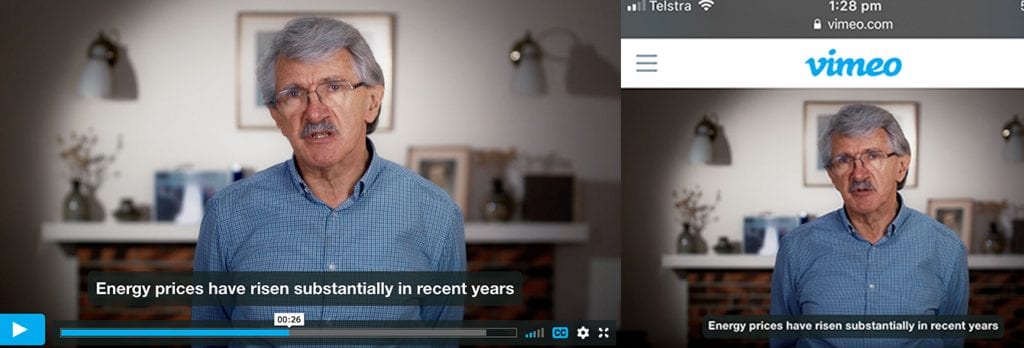
For websites and video platforms that support closed captions, this is usually the preferred accessibility option.
2. Platform-generated captions
Many social and video platforms can automatically generate captions from the soundtrack.
This can be convenient, but automatically generated text should always be reviewed before publication. Names, industry terminology and Australian place names are common sources of mistakes.
Some platforms also provide caption-design tools. Instagram, for example, offers automatic captions and a Captions sticker for eligible Reels and Stories.
These captions are added through Instagram rather than uploaded as a separate SRT file. Availability and controls can vary by account, region and content type.
Platform-generated captions are useful when:
- the video is being published on one platform
- a fast social-media workflow is required
- the captions can be checked and corrected before publishing
If the same video will be used across several platforms, preparing your own approved transcript or caption file gives you a more reliable source version.
3. Burnt-in captions
Burnt-in captions are permanently embedded into the video image during editing. They are also known as open captions.
Because they form part of the picture, viewers cannot turn them off.
Burnt-in captions are useful when:
- captions need to remain visible at all times
- a platform does not accept separate caption files
- the video will be played at an event or conference
- playback conditions cannot be controlled
- captions need to follow a specific brand style
- a social-media cut-down needs prominent on-screen text
Burnt-in captions provide greater control over font, colour, size and position. The limitation is that the text cannot adapt to the viewer’s device or preferences.
They can also create problems if text is placed beneath interface elements used by Instagram, TikTok or other mobile platforms. Important text should remain inside the platform’s safe area.
Which caption method should you use?
| Where the video will appear | Recommended approach |
|---|---|
| YouTube or Vimeo | Upload an accurate caption file and keep the clean video master |
| Business website | Use an accessible video player with closed captions and consider providing a transcript |
| Upload an SRT file or carefully review Facebook’s generated captions | |
| Use an uploaded caption file where available, with a burnt-in version for important social cut-downs | |
| Instagram Reels or Stories | Use Instagram’s caption tools or upload a version with carefully positioned burnt-in captions |
| Conference or event screen | Use burnt-in captions when the text must always be visible |
| Multilingual video | Supply separate caption files for each language where the platform supports them |
| Internal training | Use closed captions where possible and provide a transcript when employees may need a searchable reference |
A useful delivery package often includes:
- one clean master video
- one accurate English SRT file
- one version with burnt-in captions for social media
- additional caption files for other languages when required
This provides flexibility without having to recreate the edit later. For staff training, agree on these outputs while planning the procedure and script, then use the training video release checklist to check the result in your learning system.
How to create an SRT caption file
An SRT file is a plain-text document. Each caption contains:
- A sequence number
- A start and finish timecode
- The caption text
- A blank line before the next caption
A correctly formatted example looks like this:
1
00:00:01,000 --> 00:00:05,000
Welcome to this guide to video captions.

2
00:00:05,500 --> 00:00:09,000
We will look at the main delivery options.
Notice that SRT timecodes use a comma before the milliseconds.
Save the file as plain UTF-8 text with the .srt extension. On a Mac, TextEdit needs to be switched to plain-text mode before saving.
Although an SRT file can be created manually, captioning software and professional editing programs can generate the initial timing automatically. The text and timing should still be reviewed by a person before delivery.
How to make captions readable
Accurate words are only part of good captioning. Viewers also need enough time to read them.
As a practical guide:
- use no more than two lines at a time
- break lines at natural points in the sentence
- keep captions synchronised with the speaker
- remove captions when the speech finishes
- identify speakers when it is not visually obvious
- include important sounds where accessibility is required
- use strong contrast between the text and background
- avoid covering faces, graphics or important actions
- check the captions on a mobile screen before publishing
For screen recordings, keep captions clear of menus, input fields and the action being demonstrated.
The Australian Government Style Manual recommends keeping caption blocks short, with no more than 42 characters per line, and reviewing both accuracy and timing before publication.
Uploading an SRT file to YouTube
YouTube supports SRT and several other caption formats.
To upload an SRT file:
- Open YouTube Studio.
- Open Subtitles from the left menu and select the video.
- Add the required language, then choose Add under Subtitles.
- Choose Upload file, select With timing for an SRT file, and choose the file.
- Review the timing and text.
- Save the captions.
YouTube requires basic SRT files to be saved as plain UTF-8 text. See its caption upload instructions and supported file formats for current controls and requirements.
Adding captions to Facebook
Facebook supports uploaded SRT files for videos. Caption controls vary with the publishing surface, so check the options available for the video you are posting.
The exact interface may change, but caption controls are generally available through the video’s editing or video-options menu.
Facebook also has a specific naming convention for uploaded SRT files. Check the current Meta caption instructions before delivery, particularly when supplying more than one language.
Adding captions to LinkedIn
LinkedIn supports SRT caption uploads from desktop. It also offers automatic captions with review and editing controls. Review the full text before publishing, especially names, product details and technical instructions.
Adding captions to Instagram
For most organic Instagram workflows, you cannot upload a separate SRT file in the same way as you can on YouTube or Vimeo.
Instead, you can:
- use Instagram’s automatic caption controls
- add the Captions sticker to eligible Stories or Reels
- upload a version with captions embedded during editing
Always review automatically generated captions. If a video contains names, technical information or important instructions, professionally prepared burnt-in captions may provide greater accuracy and visual consistency.
Do captions improve video SEO?
Captions may help video platforms understand the spoken content of a video, particularly when the platform processes the caption file directly.
However, captions are not a shortcut to higher Google rankings.
Google’s video-search guidance covers factors such as:
- a crawlable page containing the video
- a clear page title and description
- an accessible video player or file
- a stable, high-quality thumbnail
- accurate video metadata
- VideoObject structured data where appropriate
- a video sitemap for larger libraries
The strongest reasons to include captions are accessibility, comprehension and flexibility. Any discoverability benefit should be treated as an additional advantage rather than a guaranteed SEO result.
Should you use automatic captioning?
Automatic transcription is a useful starting point, but it should not be treated as the finished product.
Common errors include:
- people’s names
- business and product names
- acronyms
- technical terminology
- Australian place names
- words spoken over music or background noise
Review the full caption file against the recording before publication, including names, timing and meaningful sounds. For specialist content, ask someone familiar with the subject to check technical terms and instructions as well.
Need help adding captions to your videos?
The best captioning approach depends on the video, audience and delivery platforms.
Dream Engine can provide:
- accurate caption and subtitle files
- burnt-in captions for social media
- multilingual caption versions
- transcripts
- vertical, square and widescreen video versions
- caption corrections for existing videos
- accessible delivery packages for websites, training and internal communications
Our video editing team can prepare the right combination of clean masters, caption files and platform-ready versions for your project.
Get in touch to discuss what you need.
Browse our training video guides and project examples for related planning advice.
Frequently asked questions
Video captions and subtitles
What is the difference between subtitles and captions?
Subtitles generally display spoken dialogue and are often used for language translation. Captions can also identify speakers and describe meaningful sounds, making them more suitable for accessibility.
What is an SRT file?
An SRT file is a plain-text caption file containing numbered captions, timecodes and dialogue. It can be uploaded alongside a video on platforms such as YouTube, Facebook and Vimeo.
Are separate caption files better than burnt-in captions?
Separate caption files are usually preferable when the platform supports them because viewers can turn them on or off and the text can adapt to different devices. Burnt-in captions are useful when captions must always be visible or when the publishing platform does not accept a separate file.
Can I upload an SRT file to Instagram?
Instagram does not generally accept separate SRT uploads for organic Reels and Stories in the same way as YouTube or Vimeo. You can use Instagram’s automatic caption tools, its Captions sticker where available or upload a video with captions embedded during editing.
Should automatic captions be checked?
Yes. Automatic captions frequently make mistakes with names, technical terms, acronyms and unclear speech. Every caption should be reviewed when accuracy is important.
Should every business video include captions?
Most business videos benefit from captions, particularly social-media videos, training content, website videos and public communications. They make the content more accessible and allow viewers to understand it without sound.
Do captions improve video SEO?
Captions may help some platforms understand the video’s spoken content, but they do not guarantee improved rankings. Accessibility and comprehension are the strongest reasons to include them.
Ryan Spanger is the founder and managing director of Dream Engine, a Melbourne video production company established in 2002. Over the past two decades, he’s produced hundreds of videos for businesses, government departments, universities and healthcare organisations across Australia. Ryan specialises in helping organisations explain complex ideas through clear, engaging video content, with particular experience in corporate communications, training and education.