Choosing an animation style is easier when you can see what it does for a real message. A digital credential service needs to explain a process. A ventilation product needs to show something happening inside a roof. A logo sequence has only a few seconds to identify the business.
These five animated video examples come from Dream Engine projects. They show how 2D characters, motion graphics, 3D visualisation and hand-drawn illustration can serve different purposes. Below each example, we explain what to consider when planning similar work.
What should the animation help people see?
Start with the part of your message that is difficult to show. If the audience needs to understand who does what, illustrated people and diagrams may be enough. If they need to understand a product’s shape, internal parts or position in a building, a 3D model may make the explanation easier.
2D and 3D describe how the imagery is constructed. Motion graphics describes the use of moving graphic elements, such as type, icons and diagrams; it can involve either. Whiteboard animation usually uses a drawn illustration style. These are overlapping choices, so a brief can combine them.
| What needs explaining? | Approach to consider | Example below |
|---|---|---|
| A service and the people using it | 2D character animation | Digitary |
| A technology offering on an exhibition screen | 2D graphics with readable text | Motorola Solutions |
| A product working inside a physical space | 3D product visualisation | Bradford Ventilation |
| A process explained through drawn scenes | Hand-drawn or whiteboard style | Global Victoria |
| A consistent opening or closing identity | Logo animation | Adapt Wealth |
2D explainer animation: Digitary
Digitary engaged Dream Engine to explain its digital credential platform: how academic records can be issued, shared and verified online. The subject involves technology, but the useful starting point for a viewer is what they can do with their records.
The film uses illustrated characters and a restrained green, black and white palette. Our guide to 2D explainer animation looks more closely at how this approach can simplify a complex subject. Giving the explanation a person to follow helps connect an abstract service with an everyday task. The character’s world can stay simple while the script explains the process.
The production lesson: decide whether you are introducing a service or teaching someone to operate it. An overview can simplify the interface and concentrate on the steps. A training video may need accurate screen recordings, readable controls and more time on each action. Trying to make one short animation do both jobs can leave new viewers with too much detail and existing users with too little.
For a similar brief, list who issues the information, who uses it and what happens next. Those relationships give the script and storyboard a structure before you choose a character design.
Watch: Digitary explainer animation · 2 min 3 sec
Notice how illustrated people give the digital credential process a human context.
Promotional animation: Motorola Solutions Australia
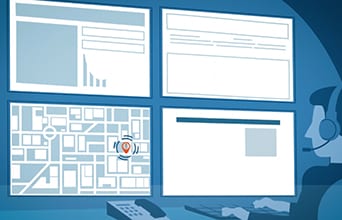
Motorola commissioned a series of 2D animated clips to introduce and promote its technology. The clips were originally intended to play in the background at a trade show and were later used on the website. The compilation below includes an “Incident & Dispatch” sequence, using a prominent heading and an illustrated operator to establish the subject.
That viewing environment changes the brief. At an exhibition, someone may arrive halfway through a loop, glance at the screen from a distance or never hear its soundtrack. Important information needs to survive those conditions.
For an exhibition version, make each section understandable on its own. Use text that can be read from the expected viewing distance, allow time to take it in and check whether the main idea works with the sound off. A sequence that depends on hearing an opening sentence is harder to join midway through.
The website version deserves its own review. A visitor who has chosen to watch can follow a fuller explanation, but may need more context than someone already standing at the company’s exhibition stand. Reusing the animation is useful; the introduction, pacing and next step may still need to change.
Watch: Motorola animation compilation · 3 min 39 sec
Watch the opening Incident & Dispatch sequence, then consider how its message would work with the sound off.
3D product animation: Bradford Ventilation
Bradford Ventilation commissioned short 3D animations for YouTube pre-roll advertising. The WindMaster example below runs for about 16 seconds, so the explanation has to be selective.
The house becomes a transparent, wireframe-style view. You can see the roof ventilator, vents at the eaves and coloured airflow imagery in relation to the building. This is where 3D earns its place: it connects the visible product with a process that ordinary exterior footage would leave hidden.
A polished product shot tells you what an object looks like. A useful demonstration also shows where it sits, what it connects to and what changes when it operates. For your own product animation, identify which of those questions the audience actually needs answered.
Review the explanation as carefully as the appearance. Arrows, transparent surfaces and moving parts all make claims about how a product works. Have the relevant technical specialist check the storyboard and animation. A visually convincing model can still give the wrong impression of scale, airflow, sequence or performance.
Agree on the required level of accuracy early. Photographs, drawings or existing CAD files can help establish the shape, but supplied models may still need preparation for animation. If you need several products or installation scenarios, include them in the scope before modelling begins.
Watch: Bradford WindMaster product animation · 16 sec
Around 7 seconds, watch the transparent house reveal the relationship between the roof ventilator, eave vents and airflow.
Hand-drawn animation: Global Victoria
This Global Victoria example uses a whiteboard style for a video about ecommerce in China. Drawn people and workplace scenes sit alongside an on-screen form, with callouts identifying information such as annual turnover, employee numbers and an ABN.
The combination is useful: illustration provides a familiar setting, while the form gives the explanation something concrete to refer to. A single film can move between a general idea and a specific action without illustrating every detail in the same way.
With this style, the drawing sequence affects the pace. Each reveal should arrive when the viewer needs it. If a sentence explains three steps while the screen is still drawing the first, the audience has to follow two different sequences.
When reviewing a whiteboard storyboard, check what is already visible, what is being added and what the voiceover is explaining at that moment. Use screen detail where it helps someone recognise a task, and keep small text out of scenes where it cannot be read.
Also consider the life of the material. A general explanation may remain useful after a form or online service changes. Keeping detailed instructions in separate sections can make future updates more manageable.
Watch: Global Victoria whiteboard animation · 2 min 19 sec
Notice the change between drawn workplace scenes and the detailed on-screen form.
Logo animation: Adapt Wealth
The Adapt Wealth example is a short brand sequence, finishing on the company name and website address. Its job is to identify the business and provide a consistent finish to a video.
A logo animation needs to work within the video that surrounds it. An extended opening may suit an event presentation, while a short social clip may need to begin immediately with the subject. The same brand can use a fuller closing sequence and a shorter opening treatment.
For a similar project, decide where the animation will appear, how much time it can take and which backgrounds it needs to work against. Supply the approved logo artwork and brand guidelines, then agree on any sound, website address or required wording. Check the finished identity at the smallest size viewers will see.
If it will be reused across a series, specify the versions and handover requirements in the brief. A video with a fixed background and an overlay for use on other footage are different deliverables.
Watch: Adapt Wealth logo animation · approximately 8 sec
Watch how the sequence resolves into the company name and website address.
What affects the work behind an animation?
Runtime is only one part of the scope. Bradford’s short product spot and Digitary’s longer explainer involve different kinds of work. Their lengths alone do not tell you which would cost more to produce. For indicative budgets and inclusions, see our animation cost guide.
Scenes and assets
Count what needs to be designed: characters, environments, products, diagrams and screen layouts. A short film with many new scenes can require more design than a longer explanation that reuses a small set of assets. Existing brand artwork may help, but it needs to suit the movement and screen sizes planned.
Movement and accuracy
Animating a title is different from animating a character’s performance. A simplified product diagram is different from a detailed model with moving parts. Tell the production team what must be technically accurate and what can be represented more simply.
Versions and later updates
Different languages, vertical edits and alternate calls to action can affect layout and timing. Translated text may take up more space, and a scene designed around a wide diagram may need rearranging for a phone screen. Plan these versions before approving the storyboard.
When comparing quotes, compare the proposed work. Check whether scripting, storyboard development, illustration or modelling, voiceover, sound, captions, review rounds and alternate versions are included. Ask what happens if the approved script changes once animation has begun.
Review the decisions before the animation is finished
Ask for approval points that let you assess the message, look and timing separately. Our animation production process guide explains what to review at each stage. A script lets subject experts check the explanation. A storyboard pairs that explanation with proposed images. Style frames show the intended illustration, colour and typography.
A timed storyboard, often called an animatic, can then reveal whether the audience has enough time to read a label or understand a diagram. It is useful for finding a rushed sequence before the detailed movement is built.
Bring the people responsible for technical accuracy, brand and final approval into the relevant reviews. Consolidate their feedback so the animator receives one agreed set of changes. Ask viewers unfamiliar with the subject to describe what they understood; their answers may expose a missing step that the project team no longer notices.
Turn a reference video into a useful brief
Send references with a sentence explaining what you want to borrow from each. “We like this” leaves the producer guessing whether you mean the illustration, pace, narration or amount of detail.
For example: “Our audience needs to understand where the product sits inside the building. The transparent view in the Bradford example is useful, but our video needs time to explain three installation steps.” That gives the reference a purpose without asking for a copy of another client’s film.
Include the audience, the question the video must answer, where it will be watched, the deadline and a budget range if you have one. Add any existing artwork or technical material and identify who can check the explanation. Our video production brief guide can help you gather those details.
The strongest choice may be a simple diagram, a detailed 3D view or a combination of animation and filming. Choose the approach that makes the important point visible. If you would like help deciding, get in touch with a short description of what you need to explain.

Ryan Spanger is the founder and managing director of Dream Engine, a Melbourne video production company established in 2002. Over the past two decades, he’s produced hundreds of videos for businesses, government departments, universities and healthcare organisations across Australia. Ryan specialises in helping organisations explain complex ideas through clear, engaging video content, with particular experience in corporate communications, training and education.